
Q1: How do I place an order on BazaarExpress?
Ready to shop? The BazaarExpress process is quick and user-friendly.
- Navigate to the "Shop"
- Choose the items you require and add them to your cart.
- Go to your cart and complete the secure checkout process.
- All costs are fully disclosed during checkout. The final amount displayed is the exact sum you will be required to pay, with no additional or concealed fees.
Note regarding Cash on Delivery:This payment method is applicable for order values within a specific range. The minimum qualifying order total is Rs. 199, and the maximum permitted is Rs. 199,000. - Not allowed to place an order → Can't place orders directly / unable to process orders.
- Guide you on how to place an order → Guide you through the process / provide instructions / assist you with the steps.
- Quite simple... give this a try! → Quick and easy / straightforward / simple / we encourage you to try it.
- Sign up... choose... pay! → Create an account, shop, and checkout / register, select items, and complete payment.
Q2: Why am I unable to place an order?
- Follow these steps to fix the order error:
- Step 1: Verify Account Information
Ensure your registered email and contact number in your account are complete and correct. - Step 2: Validate Your Address
If the system flags your address, delete the existing entry and input it again carefully. - Step 3: Check applied Vouchers
Remove any discount voucher from your cart and attempt to proceed without it. - Step 4: Review Cart Quantities
Confirm that no single product exceeds 5 units in your cart, as this is the maximum allowed per order.
Error Messages |
Account & Access Issues
- Account Blocked:Your account has been permanently deactivated due to violations of our platform's terms and conditions.
- Email Domain:Please update your account with a valid business or organizational email address (e.g., name@yourcompany.com) to continue.
Q3: Voucher & Promotion Errors
- Voucher Blocked (Terms Violation):Voucher redemption is unavailable on your account due to terms and conditions violations. Please remove the voucher to proceed with your order.
- Voucher Already Used:This voucher code has already been redeemed. Please remove it or choose a different voucher to continue.
- Voucher Limit Reached:You have reached the maximum usage limit for this voucher. Please remove it from your cart to place your order.
- Daily 'Any 5' Limit Used:You have already used your 'Any 5' discount offer for today. You may try again tomorrow.
- Weekly 'Any 5' Limit Used:You have already redeemed the 'Any 5' discount. This offer can be used again after 7 days.
- One-Time 'Any 5' Discount Used:You have already claimed your one-time 'Any 5' discount offer.
- Daily Purchase Limit Reached:You have reached your daily purchase limit for 'Any 5' items. Please try again tomorrow.
Q4: Cart & Order Restrictions
- Minimum Order Value Not Met:Your cart total is below the required minimum order value. Please add more items to proceed.
- Gift Card Restriction:Gift cards cannot be purchased in this transaction. Please remove the gift card or contact Customer Care for assistance.
- Self-Purchase Restriction:You cannot add items from your own store to your cart. Please select products from other sellers.
- Seller Order Limit:You have reached the maximum number of orders allowed with this specific seller. Please choose items from a different seller.
- Store Access Restricted:You are not permitted to order items from this store. Please select products from an alternative store.
- Item Quantity Limit:You have reached the maximum allowed purchase limit for certain items in your cart. Please remove them to continue.
- Pending Orders:You currently have orders awaiting delivery. Please wait for these to be delivered before placing new orders.
Q5: Delivery & Address Issues
- Address Undeliverable:We are unable to deliver to your selected address. Please choose a different delivery address to proceed.
- Pick-Up Point Limit:You have exceeded the order limit for the BazaarExpress Pick-Up Point. Please select a different delivery address to complete your purchase.
Q6: General Support
- Need Further Help?If you continue to experience issues, please reach out to our support team via WhatsApp Chat for assistance.
Q7: What are the expected delivery timelines?
To check when your order will arrive, please visit the "My Orders" section. You can also refer to our help article on tracking orders for more details.
We work hard to deliver every order as quickly as possible. You can see the estimated delivery time for each item in the "Delivery" section on its product page. If your shipment is taking longer than expected, you can find information about potential hold-ups in our article on common reasons for delivery delays.
Q8: What are the delivery charges?
Delivery charges refer to the fees collected by Bazaarexpress for shipping products to a customer. For each completed delivery, a specific delivery fee is applied to the customer's order.
Please note that if the actual weight or dimensions of an item differ from the original estimates, the final delivery fee may be adjusted accordingly.
Q9: Is it secure to pay via Credit/Debit Card?
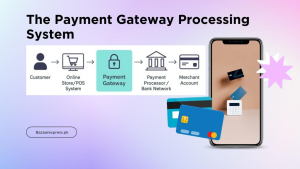
Rest assured that all credit and debit card payments on Bazaarexpress are protected by advanced security measures. We implement the highest security protocols on our platform to keep every transaction safe.
Q10: Understanding the Cash Payment Fee
- What is a Cash Payment Fee?
This is an additional charge applied to orders that use Cash on Delivery (COD). It covers the operational cost of offering the convenience of paying in cash when your order arrives. - How can I avoid paying the Cash Payment Fee?
You can avoid this fee entirely by choosing a digital payment method at checkout. Options like debit/credit cards/virtual, or other partner wallets (e.g., Easypaisa, JazzCash) are secure, reliable, and eliminate the need to arrange for cash upon delivery. - Is the Cash Payment Fee refundable?
Yes. If your entire order is canceled or returned, the full Cash Payment Fee will be refunded. For partial returns, a proportional refund of the fee will be issued based on the value of the returned items. - Why does Bazaarexpress charge a Cash Payment Fee?
The fee helps manage the higher processing costs and risks associated with cash transactions, enabling us to continue offering the flexible COD payment option to our customers. - How is the Cash Payment Fee calculated?
The fee is calculated as a percentage of your final cart value (after all discounts and vouchers are applied), with a fixed maximum cap per order. Currently, the COD fee is a fixed charge of PKR 199 on all eligible products.
Q11: Payment Options at Bazaarexpress
What payment methods can I use?
We offer several secure payment options for your convenience:
- Easypaisa Mobile Account
- Credit or Debit Card
- JazzCash Mobile Account
- Cash on Delivery (COD)
How do I know if a product is available for COD?
Look for the "Cash on Delivery" tag or badge on the product information page.
What should I verify when making an online payment?
For a smooth transaction, please double-check the following details:
- Your correct contact information.
- Your payment account details.
- Your card number (if paying by card)follow the below mentioned image instructions.
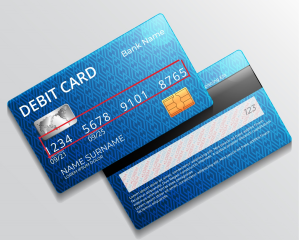
- Card Numberof your Bank Debit/Crebit/Virtual Card
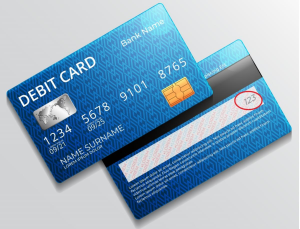
- CVV Codeof Card
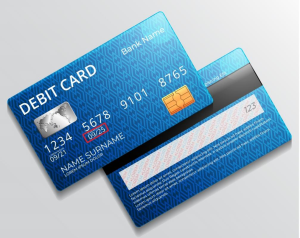
- Expiry Date of the Card
Q12: Payment Deduction for a Cancelled Order
Why was my payment deducted even though my order was cancelled?
If you paid for an order that was later cancelled, you can find the specific cancellation reason in your "My Cancellations" section. After receiving an SMS or email notification about a payment deduction, it can sometimes take up to 24 hours for your bank or payment service to update and reflect the reversal.
What should I do?
We advise waiting for 24 hours from the time of the notification. After this period, if the funds have not been returned, please contact our WhatsApp Number via Chat: Mon-Sun (10AM – 7PM) with the following details:
- A screenshot of the transaction message showing the deduction.
- If you paid using Easypaisa or JazzCash, please provide your associated account number.